Showing posts with label password ဆိုင္ရာ. Show all posts

iPhone Pattern & Password Lock ျဖည္နည္း

Wednesday, February 5, 2014


နည္းလမ္း(၁)

1.
ကြန္ပ်ဴတာနဲ႕ခ်ိတ္ဆက္ပါ။

2. iFunBox အသံုးျပဳၿပီး "Raw File System" (File mgr.) ထဲ ဝင္ပါ။

3. /Library/MobileSubstrate/DynamicLibraries ထဲဝင္ၿပီး AndroidLock နာမည္နဲ႕အစျပဳတဲ့ ဖိုင္ႏွစ္ခုကို Delete လုပ္ပါ။

4. iDevice ကို ပါဝါပိတ္ၿပီး ျပန္ဖြင့္ပါ။

5. ျမင္ေနက် "Slide to Unlock" ဆိုတဲ့ screen ကို ေတြ႕ရပါလိမ့္မယ္။Done!

နည္းလမ္း(၂)

ကြန္ပ်ဴတာနဲ႕ခ်ိတ္ဆက္ပါ။

iFunbox ကို ဖြင့္ပါ။ ျပီးလ်ွင္ /var/mobile/Library/Preferences ကို သြားပါ။

com.zmaster.AndroidLock.plist ဆိုတဲ့ File Text Editor တစ္ခုခုနဲ့ ဖြင့္ပါ။

<key>Password</key>

<string>123456 </string> ျကားက နံပါတ္မ်ားသည္
Password ျဖစ္ပါတယ္။


Download
iTunes ေဒါင္းရန္ႏွိပ္ပါ

i-funbox ေဒါင္းရန္ႏွိပ္ပါ


credit to http://www.mm-mpxteam.net/
အဆင္ေျပပါေစ . . . 
နည္းပညာတကၠသိုလ္(မေကြး)
Read more ...

ကြန္ပ်ဴတာ window passwordေမ့ခဲ့ရင္

Friday, January 10, 2014

  Window Admin Password ေမ့သြားရင္ပဲျဖစ္ျဖစ္ (သို႔) Password မသိပဲ ေက်ာ္ဝင္ခ်င္ရင္ပဲျဖစ္ျဖစ္  2GB ပမာဏေလာက္ရွိတဲ႔ USB တစ္ေခ်ာင္းနဲ႔ အလြယ္တကူ ေက်ာ္ဝင္လို႔ရႏိုင္ပါတယ္..။

ဘယ္လိုေက်ာ္ရမလဲဆိုရင္ေတာ့ နည္းလမ္းက လြယ္လြယ္ေလးပါ 162KB ေလာက္ပဲရွိတဲ႔ Software ေလးနဲ႔ 2GB (or) 4GB ပမာဏ ရွိတဲ႔ USB (or) Memory Card တစ္ခုပဲလိုတာပါ ... ဟို Setting ႏွိပ္ ဒီ Setting ႏွိပ္ နဲ႔ ေခါင္း အစားခံစရာလဲ မလိုပါဘူးး.. Window CD အေခြလည္း မလိုသလို Hirens BootCD လို ေဆာ့ဖ္ဝဲလ္ ၾကီးၾကီးလည္း အခ်ိန္ကုန္ခံျပီး ေဒါင္းယူေနစရာ မလိုပါဘူး...   USB Stick (or) Memory Card ေလးရွိရံုနဲ႔ အလြယ္တကူ ေက်ာ္ဝင္ႏိုင္ပါတယ္..။

ေအာက္ေဖၚျပပါနည္းလမ္းအတိုင္း တဆင့္ခ်င္းလုပ္ေဆာင္လိုက္ပါ...။
 Stick (or) Memory Card ကို ကြန္ျပဴတာမွာ တပ္ပါ USB Device > Right Click > Fat32 Format နဲ႔ Format ခ်လိုက္ပါ..။

 USB Stick ကို ကြန္ပ်ဴတာမွာ တပ္လွ်က္အေနအထားမွာရွိေနပါေစ...။

ဒါေလးကို Download လုပ္ယူပါ 162KB ပဲရွိပါတယ္
 kon-bootUSB.rar  ဆိုတဲ႔ .Rar ဖိုင္လ္ ေလးကို ျဖည္လိုက္ပါ..။
ျဖည္ထားတဲ႔ ဖိုလ္ဒါ ထဲက kno-boot-usb.exe ဆိုတဲ႔ Application ေလးကို ပံုပါအတိုင္း Double Click ႏွိပ္လိုက္ပါ...

CMD Command box ပြင့္လာရင္ မိမိ ရဲ႕ USB Drive F , I , G , H , J တခုခုကို ေရးျပီး....(ဥပမာ မိမိ ရဲ႕ USB Drive က F ဆိုရင္ CMD command မွာ F ရးထည့္ျပီး Enter ေခါက္လိုက္ပါ...။ ျပီးရင္ Press Any Key ကီး တခုခု ကိုႏွိပ္ေပးျပီး ထြက္လို႔ရပါျပီ....:)


အားလံုးျပီးသြားျပီ ဆိုရင္ေတာ့ ကြန္ပ်ဴတာကို Restart ခ် (F2 (or) F12 (or) Del (or) F9 Boot Menu ထဲဝင္ဖို႔ ႏွိပ္ရမဲ့ Key ေတြကေတာ့ ကြန္ပ်ဴတာ အမ်ိဳးစားေပၚမူတည္ျပီး ကြဲသြားႏိုင္ပါတယ္) Key တခုခုကို ႏွိပ္ျပီး BIOS Boot Menu ကို ဝင္ပါ..  ရိုရိုး Window တင္သလိုပဲ 1st BOOT မွာ USB 1st Kon-Boot ကို ေရြးေပးျပီး Enter ေခါက္လိုက္ပါ..။


ခဏ ေနလို႔ Window တတ္လာရင္ OK (or) Enter ေခါက္ျပီး Admin Password ကို အလြယ္တကူ ေက်ာ္လို႔ရသြားပါျပီ...။

Window 7 မွာ စမ္းသပ္ျပီးပါျပီ ၁၀၀၀% အဆင္ေျပပါတယ္..
ခုေနာက္ထြက္တဲ့ Window 8 မွာေတာ့ စမ္းမၾကည့္ရေသးပါဘူး..။ Window 8 မွာ စမ္းသပ္လို႔ အဆင္ေျပခဲ့ရင္ Comment ေလးခ်န္ထားေပးခဲ့ၾကဦးခင္မ်ာ...:)
ဝင္းကမာၻေက်ာ္
Read more ...

္facebook passward ေမ့ခဲ့ရင္

Friday, December 13, 2013
အရင္ဆံုးforgot your passwardကိုကလစ္လိုက္ပါ
ျပီရင္ph nambus ,emailor fullnameဆို့အကြက္ထဲမွာမိမိ
အီးေမးလ္ထည့္ေပးလိုက္ပါ
ျပီးရင္ေမးလ္ပို့ပါလိမ့္မယ္ေမးထဲမွာ
 your requested a new face book passwordဆိုတာကိုကလစ္လိုက္ပါ
ထိုအခါpasswordအသစ္ေပးဖို့အကြက္ကေလးေပၚလာလိမ့္မည္
အသစ္ကိုနွစ္ကြက္လံုးမွာထည့္ေပးလိုက္ပါအဆင္ေျပပါလိမ့္မယ္(မွက္ခ်က္။  ။အျမဲေတာ့မရပါ ရသူမ်ားပါသည္)
အရွံဳးေတာ့မရွိဘူးစမ္းၾကည့္ပါ  အဆင္ေျပပါေစ

Read more ...

IDM has been Fake Serial Number ေျဖရွင္းနည္း

Friday, November 29, 2013
IDM 6.18 .build 7 ကစတင္ျပီး
IDM has been Registered With a Fake Serial Number 
ဆုိတာၾကီးက အေတာ္ကုိ အာရုံေနာက္ေစပါတယ္..
ကုစားနည္းေပါင္းစုံလည္း အဆင္မေျပသလုိ..
patch ေပါင္းစုံ ေျပာင္းၾကည့္လည္း မထူးပါဘူး.
ရွာေတြ႔ေတာ့လည္း တကယ္ကုိလြယ္လြယ္ကူကူပါပဲ..
အရင္ဆုံး C:\Program Files (x86)\Internet Download Manager
ကုိသြားလုိက္ပါ..အဲဒီက IDMGrHlp ဆုိတဲ့ဖုိင္..
ပုံကုိၾကည့္ပါ..
 
အ၀ါေရာင္တားထားျပီး ျမွားျပထားတဲ့ ဖုိင္ကုိ 
Right click ေပးျပီး Delete လုပ္လုိက္ပါ..
IDM has been Registered With a Fake Serial Number 
ဆုိတာၾကီးေနာက္မတတ္ေတာ့ပါဘူး..။
မလုပ္ခင္  IDM ကုိ Exit လုပ္ထားပါ
ဖ်က္ပီးတာနဲ႔ဖြင့္လိုက္ရင္ 
ဆိုတာေလးေတာ့ ေပၚလာမယ္ ပိတ္လိုက္ပါ 
IDM has been Registered With a Fake Serial Number 
ဆိုတာ မတက္လာေတာ့ဘူး  IDM အသစ္ဖြင့္တုိင္း အေပၚေဘာက္ေလးေတာ့
ေပၚလာမယ္ေနာ္ 
မွကူးယူေဖာ္ျပသည္
Read more ...

မည္သည့္ Windows Login password ကုိမဆုိေက်ာ္ျဖတ္နည္း

Wednesday, November 27, 2013
အခု ကၽႊန္ေတာ္တုိ႔ေျပာျပမွာက ၾကိဳက္တဲ့ Windows OS ရဲ႕ login password ကုိမဆုိေက်ာ္ျဖတ္နည္း အ ေၾကာင္းေျပာျပမွာျဖစ္ပါတယ္။ ေက်ာ္ျဖတ္နည္းဆုိေတာ့ မူလရွိေနျပီသား password ကုိ ခ်ဳိးလည္းမခ်ဳိးျဖတ္ ဘူး ၊ေျပာင္းလည္းမေျပာင္းဘူး နဂုိရွိေနတဲ့ အတုိင္းပဲထားမွာပါ။ကဲစၾကရေအာင္ !!

ဒီနည္းကုိ သုံးျပီး ေအာက္မွာျပထားတဲ့ OS ေတြရဲ႕ Login password ေတြကုိ ေက်ာ္ျဖတ္  ႏုိင္ပါတယ္။

Microsoft Windows XP Home Edition (Service Pack 2+)
Microsoft Windows Vista Home Basic (32/64 bit)
Microsoft Windows Vista Home Premium (32/64 bit)
Microsoft Windows Vista Business (32/64 bit)
Microsoft Windows Vista Enterprise (32/64 bit)
Microsoft Windows 7 Home Premium (32/64 Bit)
Microsoft Windows 7 Professional (32/64 Bit)
Microsoft Windows 7 Ultimate (32/64 Bit)
Microsoft Windows Server 2003 Standard (32/64bit)
Microsoft Windows Server 2003 Datacenter (32/64bit)
Microsoft Windows Server 2003 Enterprise (32/64bit)
Microsoft Windows Server 2003 Web Edition (32/64bit)
Microsoft Windows Server 2008 Standard (32/64bit)
Microsoft Windows Server 2008 Datacenter (32/64bit)
Microsoft Windows Server 2008 Enterprise (32/64bit)

Step #1 kon-boot 1.1 ကုိ  Download လုပ္ပါ။
ဒီမွာ (or ) ဒီမွာ (or) ဒီမွာ

Step #2 သင့္ရဲ႕ USB stick ကုိ Computer USB port မွာ တက္လုိက္ပါ။

Step #3 ျပီးရင္ FAT 32 file system ႏွင့္ Format လုပ္ပါ။


Step #4 Download လုပ္ထားတဲ့ file ကုိျဖည္ပါ။ျပီးရင္ "KonBoot V1.1 32 & 64 bit" ဆုိတဲ့ folder ကုိဖြင့္ပါ။

Step #5 "KonBootInstall.exe" ကုိ double click ပါ။

step #6 command prompt တစ္ခုတတ္လာ ပါလိမ့္မယ္။၄င္း command prompt ထဲမွာ သင့္ရဲ႕ USB drive letter ကုိ ေမးေနလိမ့္မယ္။ အေပၚမွာ ျပထားတဲ့ screenshot ထဲမွာ ကၽႊန္ေတာ္ရဲ႕ USB drive letter ဟာ H: ျဖစ္ပါတယ္။ USB drive letter ထည့္ျပီးသြားရင္ "Enter" ကုိႏွိပ္ပါ။USB ထဲကုိ install လုပ္လုိ႕ျပီးသြားပါျပီ။

Step #7 ကဲစမ္းၾကည့္ရေအာင္ PC ကုိ Restart လုပ္ပါ။(password မရွိသူမ်ား passsword ေပးျပီးစမ္းၾကည့္ႏုိင္ပါတယ္)။ F2 ႏွိပ္ BIOS ထဲ၀င္ျပီး First Boot Device မွာ USB ကုိထား ဒါမွမဟုတ္ F12 ကုိႏွိပ္ USB ကုိေရြးျပီး USB ကေန BOOT တတ္ပါ။

အားလုံးအဆင္ေျပၾကပါေစ။
Read more ...

Password/Pin/Pattern Lock ကိုကလစ္တစ္ခ်က္နဲ႔ျဖဳတ္ေပးမယ့္ Vroot ရဲ႕ Rommaster.exe ပါ။

Wednesday, November 27, 2013

မဂၤလာပါ......
V Root ဆိုဒ္မွာပဲရွိေနတာပါ။ Password lock / Pin Lock / Pattern Lock စတာေတြကို ကလစ္တစ္ခ်က္နဲ႔ျဖဳတ္ေပးမယ့္ Vroot ရဲ႕ Rommaster.exe ပါ။ ေဒါင္းရအဆင္ေျပေအာင္ တိုက္ရိုက္လင့္ တင္ထားပါတယ္။ Click လုပ္ရမယ့္ေနရာက Downward Arrow ပံုနဲ႔ တရုတ္စာေလးလံုးေလာက္ပါတဲ့ Button ေလးပါ။(11.12 MB  V 3.2.6  2013.07.22  ဆိုတဲ့စာတန္းေအာက္မွာပါ။) Desktop ကို screen shot ရိုက္ၿပီး ပံုတင္ဖို႔ ႀကိဳးစားေပမယ့္ အဆင္မေျပလို႕ပါ။ အဆင္ေျပပါေစ....
Download Link : http://www.mgyun.com/romasterlab
Read more ...

Simpo PDF Pass Remover 1.2 Full

Wednesday, November 27, 2013
 
Simpo PDF Pass Remover ဟာ PDF ေတြမွာ Password ေတြနဲ႔ပိတ္ထားခဲ့ရင္ တစ္ခ်က္တည္းနဲ႔ အျမန္ဆံုးျဖဳတ္ပစ္ႏိုင္ပါတယ္.. မူရင္းဆိုဒ္မွာ $ 19.95 ေပးရေပမယ့္ ကၽြန္ေတာ့္ဆီမွာေတာ့ အလကားပါ.. အသံုးျပဳရတာလည္း လြယ္ပါတယ္.. Add PDF မွာ Password ခံထားတဲ့ pdf ဖိုင္ကို ေခၚတင္လိုက္ၿပီး ညာဘက္ေအာက္ေထာင့္က Begin ကိုႏွိပ္ေပးလိုက္ရံုပါပဲ..

Full Version ျဖစ္ဖို႔ကိုေတာ့ Setup ကို Install လုပ္ၿပီးရင္ Run လိုက္ပါ.. Keygen ကိုဖြင့္ၿပီး email မွာ ထည့္ခ်င္တဲ့အီးေမးကိုထည့္ပါ.. နာမည္ရဲ႕ေနာက္မွာ @gmail.com, @yahoomail.com စသည္ျဖင့္ @ နဲ႔ mail.com ေလးေတာ့ ပါေအာင္ထည့္ေပးလိုက္ပါ.. ၿပီးရင္ ေအာက္က အကြက္မွာ ကီးေပၚလာပါၿပီ. Generate ကိုႏွိပ္ၿပီးေတာ့လည္း ကီးအသစ္ေတာင္းႏိုင္ပါတယ္.. ခု ျဖည့္ခဲ့တဲ့အီးေမးကို မွတ္ထား၊ ကီးကိုယူၿပီး ျဖည့္ရမယ့္ အကြက္ထဲမွာ ျဖည့္ေပးၿပီး Register လုပ္လိုက္ရံုပါပဲ..


အဆင္ေျပပါေစ..

ေမာင္ေပါက္< Knowledge Note >
www.maungpauk.org

Read more ...

Accent RAR Password Recovery 2.01.2241 Full Version

Wednesday, November 27, 2013
 
Accent RAR Password Recovery 2.01.2241 ကေတာ့ Password နဲ႔ပိတ္ထားတဲ့ Rar ဖိုင္ေတြရဲ႕ Password ေတြကို ျပန္ဆယ္ယူေပးတဲ့ေကာင္ပါ..


Accent RAR Password Recovery Features:-
Fully supports RAR 3.x archives
Works three ways, using brute force, mask and dictionary attacks
Offers the option of automated password recovery with predefined/user-defined scenarios
Lets the user set password mutation rules for dictionary attacks
Supports of user-defined attack scenarios
Leverages GPU computing technology to recover passwords to files with AES encryption
Fully supports the command line
Graphic interface is easy to use
Runs on Windows 7 and early Windows systems


အဆင္ေျပပါေစ..


Read more ...

ေဆာ့ဝဲ မသံုးပဲ WinRar password ကိုလြယ္လြယ္ကူကူ ျဖည္နည္း

Wednesday, November 27, 2013
က်ေနာ္လည္း မအားတာနဲ႔စာမေရးႏိူင္တာလည္းၾကာပီ
အခု႔ေတာ့ အသံုးဝင္တာေလးတခု႔ ေပးျခင္ပါတယ္ အသံုးျပဳ႕ဖို႔ လိုအပ္မယ့္
 ညီအကိုေတြ ေဘာ္ဒါေတြအတြက္ပါ ထူးထူးဆန္းဆန္း မဟုတ္ပါဘူး ဒါေပမယ္ လိုအပ္လို႔ရွာရင္
မေတြ႕ပါဘူး...ကဲစမယ္...ႏိူင္ငံျခားဆိုဒ္ေတြ ကေန software ေတြဒါင္းတဲ့အခါ rar ဖိုင္ေတြ ကို
password ေတြ ခံထားတက္ၾကပါတယ္ အဲ့ဒီ password ကို သိေနရင္ေတာ့ ဘာမွမျဖစ္ဘူး
မသိေတာ့ဘူးဆိုရင္ေတာ့ အသံုးျပဳ႕ဖို႔ ခဲယဥ္းသြားပါတယ္
 ဒါေၾကာင့္ software ေတြကိုေျဖဖို႔အတြက္အပိုေဆာ့ဝဲ ေဒါင္းစရာမလိုပဲနဲ႔လြယ္လြယ္ကူကူေျဖလို႔ရပါတယ္
သူငယ္ခ်င္းတို႔လည္း မလုပ္ဖူးေသးလို႔ မသိတာပါ တကယ္ေတာ့ လြယ္လြယ္ေလးပါ ေအာက္မွာ
က်ေနာ္ ပံုအနည္းငယ္နဲ႔ ရွင္းျပထားပါတယ္
ဒီ password ျဖည္တာကိုအသံုးျပဳ႕ဖို႔အတြက္ winrar ကိုပဲ အသံုးျပဳ႕တာပါ
မိမိ က winrar ကို အသံုးမျပဳ႕ဘူး ဆိုရင္ေတာ့ winrrar ကိုေဒါင္းထည့္ဖို႔ လိုပါလိမ့္မယ္
လိုအပ္ရင္ ဒီေနရာမွာ ဝင္ယူႏိူင္ပါတယ္


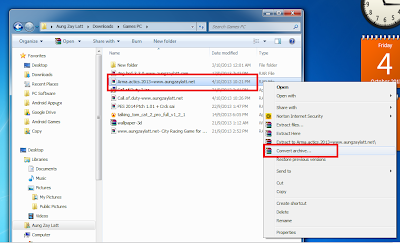
အေပၚကပံုမွာ Arma actics ဂိမ္းကိုေျဖပါမယ္
ေအာက္ကပံုအတိုင္း exe ဖိုင္ကိုပဲျဖစ္ျဖစ္ txt ဖိုင္ကိုပဲျဖစ္ျဖစ္ ကလစ္ ၂ခ်က္ေခါက္ဖြင့္မယ္ဆိုရင္
password ေတာင္းပါတယ္

ေအာက္ကပံုကိုဆက္ၾကည့္ပါ password ကိုျဖည္ပါမယ္
ျဖည္မယ့္ ဂိမ္းဖိုင္ကို(မည္သည့္ေဆာ့ဝဲျဖစ္ျဖစ္) ေထာက္ၿပီး Right click ႏွိပ္လိုက္ပါ
ပံုထဲက အတိုင္း Convert achieve ဆိုတာေလးေတြ႕ႏိူင္ပါတယ္ ႏွိပ္လိုက္ပါ

ေအာက္ပံုအတိုင္း explorer ေလးထပ္ေပၚလာမယ္ zip ကိုအမွန္ျခစ္ေပးပါ
အျပာေရာင္ အကြက္ကေတာ့ ျဖည္ၿပီးတဲ့အခါ ဖိုင္သိမ္းမယ့္ေနရာ ကိုေပးထားတာပါ
က်ေနာ္ကေတာ့Folder အသစ္လုပ္ၿပီးေတာ့ ဖိုင္ကိုသပ္သပ္ ျပန္သိမ္းလိုက္ပါတယ္
Delete Original Acheves ကိုအမွန္ျခစ္ေပးရင္ မူရင္းဖိုင္ကိုဖ်က္ၿပီးေတာ့
Folder အသစ္ေနရာမွာပဲ ျပန္သိမ္းေပးပါတယ္ အေပၚကလုပ္စရာရွိတာလုပ္ၿပီးရင္
OK ကိုႏွိပ္လိုက္ပါ

 OK ကို ႏွိပ္လိုက္ရင္ ေနာက္ဆံုးအေနနဲ႔ password ေတာင္းပါလိမ့္မယ္
ေပးလိုက္ပါ သူ achieves ဆက္လုပ္ပါလိမ့္မယ္ ေစာင့္ေပးလိုက္ပါ ၿပီးသြားရင္
ဖိုင္အသစ္ေနရာမွာသြားၾကည့္ပါ password ေပးစရာမလိုပဲနဲ႔ ဖိုင္ေတြကိုဖြင့္လို႔ရပါလိမ့္မယ္
winzip နဲ႔ ျဖည္တာေတာ့ က်ေနာ္လည္း မသိေသးပါဘူး winrar နဲ႔ ျဖည္ရလို႔ ျပန္လည္မွွ်ေဝလိုက္ပါတယ္

ကိုလတ္(ကြ်ဲဆင္း)


အဆင္ေျပပါေစ..
Read more ...

Simpo PDF Password Remover 1.2.1 Full

Wednesday, November 27, 2013
Simpo PDF Password Remover 1.2.1 
Simpo PDF Password Remover ကိုေတာ့ pdf ဖိုင္ကို password ဖယ္ရွားတဲ့ေနရာမွာ
အေကာင္းဆံုးလို့ေတာင္ေျပာလို့ရပါတယ္၊ဒီေဆာ့လ္ဝဲကိုအသံုးျပဳျပီး ကူးယူႏိုင္ျခင္း၊ စာရြက္ထုတ္ျခင္း၊ျပန္လည္ျပဳျပင္ႏုိင္ေအာင္ ပိုင္ရွင္ရဲ့ password ကိုဖယ္ရွားျပီးလုပ္ေဆာင္ႏိုင္ပါတယ္၊အားလံုး အဆင္ေျပပါေစ။

Download >> Link 1 / Link 2 
Features :
  • Remove PDF owner password restrictions
You can directly remove owner password, which prevents PDF from copying, printing and editing, to make the PDF file copyable, printable and editable.

  • Decrypt PDF user password
User password is used to restrict access to a PDF file. To decrypt the user password and make the PDF file readable, you need to enter right password to unlock it first.

  • Remove password for a batch of PDF files
Decrypt password for a batch of PDF files at a time. You can import up to 200 PDF files and decrypt their password at the same time.

  • Secure PDF and modify metadata
This PDF password remover allows you to set password to secure your output PDF with ber 128bit RC4 and AES encryption; at the same time, you could modify PDF’s metadata to claim authority.

  • Other features
A) Support multiple PDF formats. Adobe PDF 1.0 – 1.7 formats are supported; Support multi language. Now English, Italian, German, French, Hungarian, Spanish, Traditional Chinese and Simplified Chinese are available!

အဆင္ေျပပါေစ..

 Download Here !
                                
Read more ...

မည္သည့္ Android ဖုန္းမဆို Pattern Lock , Passwords Lock , Pin Lock မ်ားကို ဖ်က္ထုတ္ေပးႏိုင္မယ့္ Application ပါ

Wednesday, November 27, 2013
မည္သည့္ Android ဖုန္းမဆို Pattern Lock , Passwords Lock ,
 Pin Lock မ်ားကို ဖ်က္ထုတ္ေပးႏိုင္မယ့္ Application ေလးတင္ေပးလိုက္ပါတယ္...
 ေပးထားတဲ့ဖိုင္ကိုေဒါင္းၿပီး ရလာတဲ့ ZIP ဖိုင္ကို မျဖည္ဘဲ SD Card ထဲသို႕
 ထည့္ကာ CWM (Recovery Mode ) သို႕၀င္ၿပီး
 Install လုပ္ေပးလုိက္ရံုျဖင့္ အဆင္ေျပ သြားမွာ
ျဖစ္ပါတယ္ခင္မ်ာ... တကယ့္ကို ၀မ္းေျမာက္စရာေလးပါဘဲ.. Pattern Lock , Passwords Lock , Pin Lock က်ေနသူမ်ားအတြက္ကေတာ့ လံုး၀ အဆင္ေျပသြားတာေပါ့ဗ်ာ။
 
 အဆင္ေျပပါေစ..


Download :

Read more ...